The PHP substr_replace function can be used to replace a certain part of the string with other strings. The designer can set the new string to be replaced, where to start from, and the length of the string to be replaced. in PHP 4.3.3 version of the beginning, substr_replace functions have begun to support array array element replacement. Please note that the substr_replace function performs string replacement in the copy, and returns a string result after the processing is completed. If the processing is an array, an array is returned.
PHP substr_replace basic syntax
substr_replace ($string, $replacement, $start, $length)
The PHP substr_replace function has 4 parameters. The first parameter $string is the original string or original array, the second parameter $replacement is the content of the string to be replaced, and the third parameter $start is the string to be replaced. Position. This parameter can be a positive integer or a negative integer. When $strat is a positive integer, the replacement position will start from the $start position of $string. If $start is a negative integer, the replacement will start from the bottom of $string $start Start counting. The last parameter $length is the length of the string to be replaced. It is not necessary to select the item. If it is a positive integer, it means the length of the string to be replaced. If it is a negative integer, it means that the end of the replacement string is away from the original word. The number of characters at the end of the string $string. If it is filled in, it defaults to strlen($string), which is the length of the original string. If you write 0, it means that the replacement string $replacement will be inserted directly into the position set by $start .PHP substr_replace example one, string replacement
<?php
$MyString ='ABCDEF';
// Replace the original string with ZZZ
echo substr_replace($MyString,'ZZZ', 0).'<br>';
echo substr_replace($MyString,'ZZZ', 0, strlen ($MyString)).'<br>';
// insert ZZZ at the beginning of the original string
echo substr_replace($MyString,'ZZZ', 0, 0).'<br>';
// replace the original with ZZZ The letters of the string E
echo substr_replace($MyString,'ZZZ', 3, -1).'<br>';
echo substr_replace($MyString,'ZZZ', -3, -1).'<br>';
// Replace the letter D of the original string with a null value
echo substr_replace($MyString,'', 3, 1);
?>
Example output$MyString ='ABCDEF';
// Replace the original string with ZZZ
echo substr_replace($MyString,'ZZZ', 0).'<br>';
echo substr_replace($MyString,'ZZZ', 0, strlen ($MyString)).'<br>';
// insert ZZZ at the beginning of the original string
echo substr_replace($MyString,'ZZZ', 0, 0).'<br>';
// replace the original with ZZZ The letters of the string E
echo substr_replace($MyString,'ZZZ', 3, -1).'<br>';
echo substr_replace($MyString,'ZZZ', -3, -1).'<br>';
// Replace the letter D of the original string with a null value
echo substr_replace($MyString,'', 3, 1);
?>
ZZZ
ZZZ
ZZZABCDEF
ABCZZZF
ABCZZZF
ABCEF
As long as you master the usage of the two parameters $start and $length, you can almost master the PHP substr_replace function.ZZZ
ZZZABCDEF
ABCZZZF
ABCZZZF
ABCEF
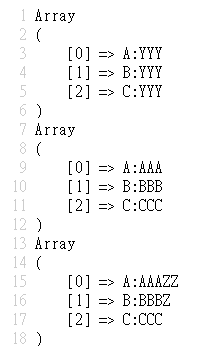
PHP substr_replace example two, array replacement
<?php
$MyArray = array('A:ZZZ','B:ZZZ','C:ZZZ');
// Replace ZZZ in the original array with YYY
print_r(substr_replace($MyArray,'YYY',2, 3));
// Replace the original array element with the corresponding array element
$replace = array('AAA','BBB','CCC');
print_r(substr_replace($MyArray, $replace,2,3));
/ / Use the value of the array to control the length of the string replaced by the original array element
$length = array(1, 2, 3);
print_r(substr_replace($MyArray,$replace,2,$length));
?>
Example output$MyArray = array('A:ZZZ','B:ZZZ','C:ZZZ');
// Replace ZZZ in the original array with YYY
print_r(substr_replace($MyArray,'YYY',2, 3));
// Replace the original array element with the corresponding array element
$replace = array('AAA','BBB','CCC');
print_r(substr_replace($MyArray, $replace,2,3));
/ / Use the value of the array to control the length of the string replaced by the original array element
$length = array(1, 2, 3);
print_r(substr_replace($MyArray,$replace,2,$length));
?>


Post a Comment
0 Comments